
Clicks per listing on MercadoLibre: how to read them and what they reveal
August 12, 2026
Clicks per listing on MercadoLibre are the number of times someone tapped one of your listings to open it, counted per listing over a time window. Here is how to read them: a listing with many clicks and few sales is telling you that your title, main photo and price do catch the eye, but that something inside the listing —description, reviews, delivery time, final price with tax— is stopping the purchase. A listing with many impressions and few clicks tells you the opposite: the listing fails to get chosen in the results list. That reading, listing by listing, is what reveals exactly where your funnel breaks.
The problem is that almost nobody reads them this way. Clicks per listing live in MercadoLibre’s Metrics, Product Ads spend in another tab, your sales in Sales, your stock somewhere else, and your product costs in a separate spreadsheet. The multichannel seller ends up, once again, exporting reports at midnight and hand-matching the same SKU that goes by a different name on Amazon, on MELI and in the 3PL. By the time the table is finally built, the clicks are already from yesterday: campaigns kept spending, stock moved, and today’s decision gets made on an old snapshot.
This article is about reading that metric without fooling yourself: what a click really reveals, how it relates to impressions and conversion, and why the number on its own is useless unless you cross it with your real margin and availability, in real time and on the same dashboard.
what a click per listing actually is
A click per listing is a concrete action: someone saw your listing in a results list, in a showcase or in an ad, and decided to open it to learn more. It is not a sale, not an impression, not a casual browse of the catalog. It is the buyer’s first “yes”: the moment your product went from being one thumbnail among twenty to being the candidate they want to review.
That is why the click is the hinge of the funnel. Before the click, everything depends on what shows in the list: the main photo, the title, the displayed price, the free-shipping or Full label, the seller’s reputation. After the click, the inside of the listing takes over: the secondary photos, the description, the spec sheet, the questions, the reviews and the final price. Reading clicks separately from impressions and from sales means reading the two halves of the funnel apart, which is exactly what you need to know which half is failing.
MercadoLibre reports these clicks for both organic traffic and paid Product Ads. Mixing them is a common mistake: a spike in clicks may come from a campaign you just launched, not from a real improvement in your listing. Separating organic from paid is the first filter so you don’t confuse traction with spend.
high clicks, low sales: the problem is inside
The most revealing pattern is a listing that gathers many clicks and converts poorly. It means the bait works —title, image and list price win the click— but something inside discourages the buyer. The typical causes are concrete: the final price with tax climbs higher than the buyer expected, delivery time is long compared to a Full competitor, secondary photos don’t answer doubts, the description is incomplete, or there are recent negative reviews weighing on it.
Here the click saves you weeks of guessing. Instead of touching the title of a listing that already attracts well, you know the work is inside: better photos, a rewritten spec sheet, answering pending questions, or adjusting the real price. And that price adjustment is rarely an isolated event: it moves your competitiveness against other sellers and against the same product on another channel. That is why it is better governed by rules than by hand; the automatic price calendar lets you raise or lower by date without losing sight of the margin left after the change.
Glossary: real net margin is what’s left after ALL costs —product, commission, shipping, tax and advertising—, not just price minus cost.low clicks, many impressions: the problem is outside
The opposite pattern is just as valuable. A listing with many impressions and few clicks does not have an internal listing problem: it has a shelf problem. You show up in the results list, but the buyer doesn’t pick you. The cause lives in what is seen before opening: a dull main photo next to sharper competitors, a title missing the word people search for, a list price that looks expensive next to the neighbor, or the absence of the shipping label that is nearly mandatory today.
The rate that sums this up is CTR: clicks over impressions. A low CTR with high impressions is the cleanest signal that your problem is attraction, not closing. And here the cost of reading a single dashboard is high: if you only look at sales, you blame the price or the product when in reality you are never being given the click. Separating impressions, clicks and sales per listing is what turns “I’m not selling” into an actionable diagnosis instead of a frustration.
the paid click and its relationship with ACoS
In Product Ads you pay per click. Every click you buy has a cost, and the sum of those costs against the sales they generate is your ACoS. That is why clicks per listing in campaigns are not just a metric of interest: they are directly your bill. A listing that receives many paid clicks and converts poorly not only loses potential organic sales; it burns ad budget click by click.
This connects the reading of clicks to profitability. If a listing has good CTR but poor conversion, raising the bid only accelerates spend without fixing the root: you pay for more clicks that still don’t buy. The correct sequence is the reverse: first you fix the listing so the click converts, and only then do you invest in bringing more clicks. How that spend behaves depends on the campaign type and the marketplace logic; we develop it in ACoS on MercadoLibre: how Product Ads works and how it differs from Amazon, because the definition is not identical to Amazon’s.
Glossary: ACoS is ad spend divided by the sales attributed to those ads; a low ACoS does not guarantee profit.why the click lies if you don’t cross it with stock
There is a cause of falling conversion that has nothing to do with your listing or your price: you ran out of stock of the best-selling color, size or variant. The listing keeps receiving clicks just like before —the listing didn’t change—, but the variant people wanted is no longer available, so the click doesn’t convert. If you read clicks without looking at your inventory, you’ll rewrite a title that was perfect, chasing a problem that was really about availability.
That is why clicks per listing only make sense alongside real stock. A conversion that collapses overnight, with stable clicks, almost always smells like a stockout of a key variant. Crossing both signals on the same dashboard turns an hour of investigation into a two-second reading: you see clicks steady, you see availability at zero, and you know exactly what to restock.
Glossary: real available is sellable stock net of reservations and in-transit; if it drops, your conversion falls and your clicks go unconverted even though the listing hasn’t changed.the real cost of reading clicks by hand
The real problem is not that MercadoLibre doesn’t report clicks: it does. The problem is that it reports them in isolation. Clicks live in one tab, Product Ads spend in another, sales in another, stock in another and your product cost in a separate catalog. To answer something as basic as “which listing gets clicks but doesn’t convert, and is costing me money?” you have to export four reports, match SKUs that go by different names on each channel, and build a formula that hopefully has no reference error.
By the time you finish, the answer has already aged. Campaigns don’t wait for your spreadsheet: they keep buying clicks at last week’s bids. Deciding with yesterday’s clicks means overpaying for days before you correct. A single source of truth in real time changes the question from “how many clicks did I get?” to “did these clicks leave me a profit today?”, and it does so with Amazon, MercadoLibre and your 3PL unified in the same view, on the same SKU.
what you should be able to see at a glance
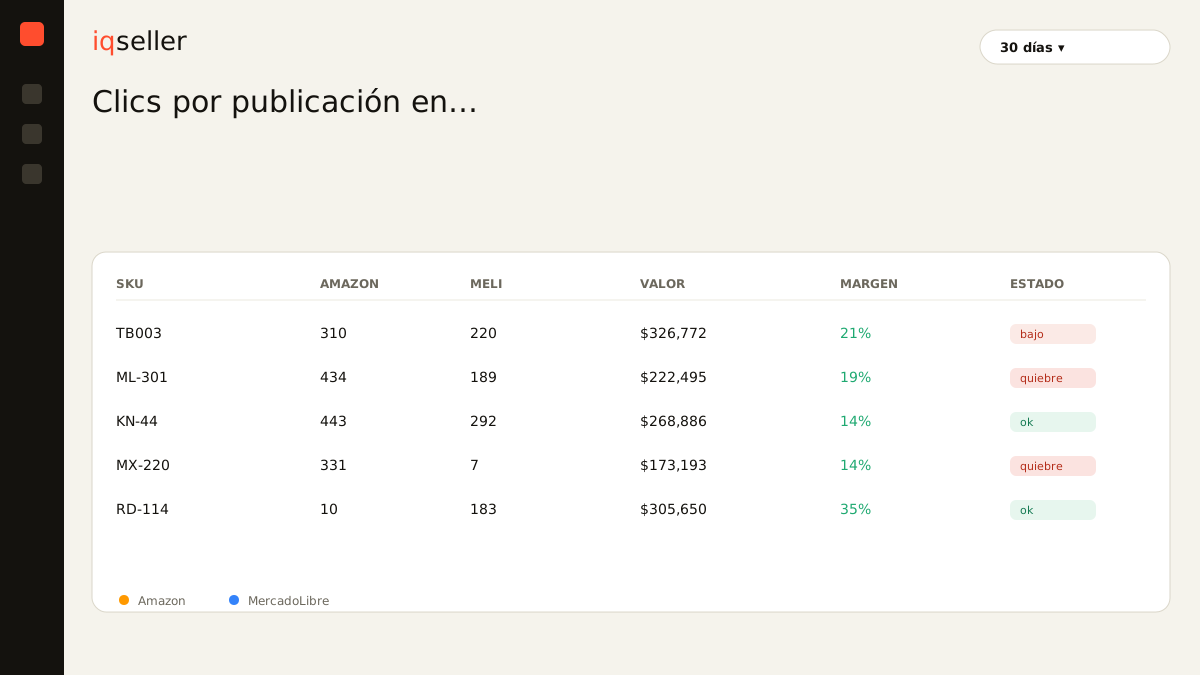
To read clicks per listing as a diagnosis and not a loose number, a useful panel shows you, per listing and per channel, at least this: impressions, clicks, CTR, conversion, paid clicks with their cost, and —the data almost never on the same screen— the real net margin and the availability of each variant. With that, every listing classifies itself: the one that attracts well but doesn’t close, the one that isn’t even winning the click, the one burning paid budget without converting, and the one that dropped only because it ran out of stock.
That reading stops being intuition. You immediately see where to work: rewrite photos on one, restock a variant on another, lower the bid on the one that bleeds and raise it on the one that converts and has margin to spare. Clicks per listing, read alone, are half the story. Crossed with margin, stock and ad spend, in real time and with your channels unified, they tell you the only thing that matters: what to do today with each listing to sell more without giving away profit.